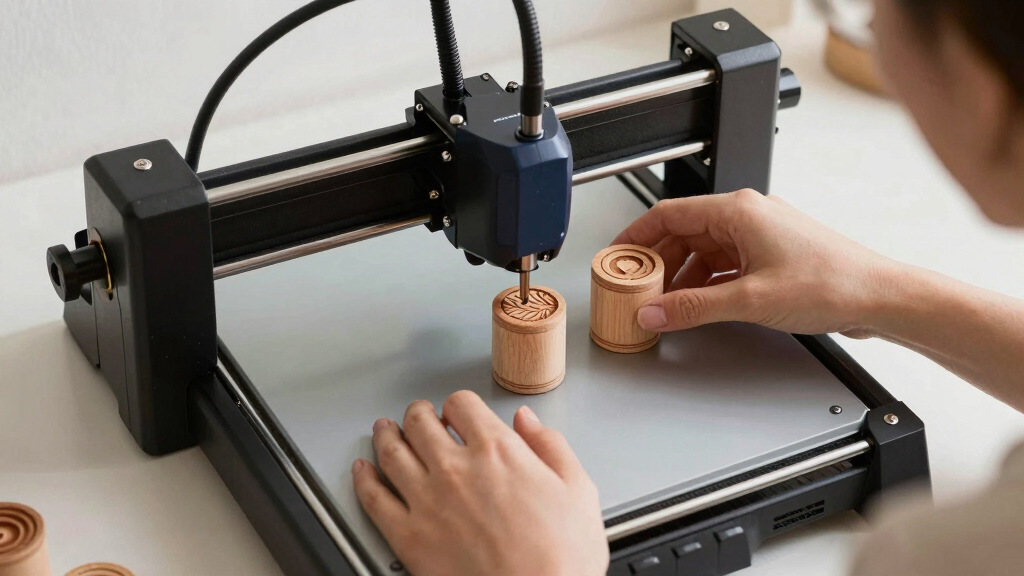

Finding the best laser engraver for tumblers and wood involves balancing power, precision, and ease of use. The Ortur R1 5000mW stands out for its portability and versatility, making it ideal for small-scale projects and beginners. The xTool S1 40W offers high power and advanced features for more detailed work and production. However, many models face tradeoffs between price, complexity, and size. Continue reading to see how these options compare and which might be right for you.

Get business pricing on tools and workshop supplies
- Business-only prices and quantity discounts
- Tax-exempt purchasing
- Multiple users, one account, clear invoices
Complete the kit


Key Takeaways
- Power and precision vary widely; higher wattage generally enables deeper engraving on harder materials like wood and metal.
- Features like rotary attachments and enclosed designs significantly influence usability for tumblers and delicate projects.
- Budget models often sacrifice some speed or detail, making them better suited for hobbyists rather than professional use.
- Ease of use and software compatibility are key factors, especially for beginners who want a straightforward setup.
- Size and portability matter if space is limited or if you plan to work on the go.
| Ortur R1 5000mW Portable Laser Engraver and Cutter, Foldable, APP Control, for Wood, Leather, Glass, Cloth |  | Best for Portability and Ease of Use | Laser Power: 5W | Engraving Area: 100 x 100 mm | Laser Spot Size: 0.025 x 0.11 mm | VIEW LATEST PRICE | See Our Full Breakdown |
| Creality Falcon 10W Laser Engraver with Air Assist and Rotary Roller | 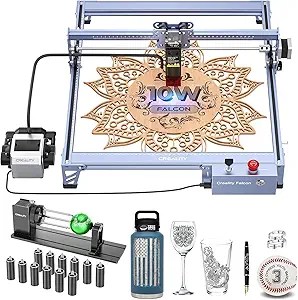 | Best for Versatility and Precision on Multiple Materials | Laser Output Power: 10,000mW | Laser Class: 4 | Engraving Speed: up to 10,000mm/min | VIEW LATEST PRICE | See Our Full Breakdown |
| AlgoLaser 400x400mm 8W Laser Engraver with 3.5″ Touchscreen and AlgoOS |  | Best for Ease of Use and Educational Projects | Work Area: 400×400 mm | Laser Power: 8W | Touchscreen: 3.5-inch HD | VIEW LATEST PRICE | See Our Full Breakdown |
| K15 Pro Laser Engraver 10W Laser Engraving Machine for Metal, Wood, Acrylic, Glass, and Stone |  | Best for Beginners and Small Projects | Laser Power: 10W | Work Area: 11.8×7.9 inches (A4) | Precision: 0.01mm | VIEW LATEST PRICE | See Our Full Breakdown |
| xTool S1 40W Laser Cutter and Engraver with Rotary Bundle |  | Best for Large-Scale and Professional Projects | Laser Power: 40W | Bed Size: 23.93″ x 15.16″ | Speed: 600mm/s | VIEW LATEST PRICE | See Our Full Breakdown |
| xTool M2 10W Laser Engraver with Dual Cameras, Enclosed Safe Design for DIY Crafts |  | Best Overall for Versatility and Safety | Power: 10W | Weight: 36.2 pounds | Dimensions: 28 x 25 x 12 inches | VIEW LATEST PRICE | See Our Full Breakdown |
| Laser Engraving Machine Woxcker L2 MAX 5.5W Enclosed Laser Engraver 300x300mm |  | Best for Precision and Safety in Hobbyist and Small-Scale Use | Laser Power: 5.5W | Engraving Area: 300x300mm | Focus Precision: 0.01mm | VIEW LATEST PRICE | See Our Full Breakdown |
| Laser Engraver 10W High Speed 400x400mm 0.01mm Ultra-High Precision |  | Best for Large Workspace and High-Speed Precision | Wattage: 10W | Work Area: 400x400mm | Laser Power: 10,000 milliwatts | VIEW LATEST PRICE | See Our Full Breakdown |
| laser engraver for tumblers and wood | Laser Power | Material Compatibility | Weight |
|---|---|---|---|
| Ortur R1 5000mW Portable Laser | 5W | Wood, Leather, Glass, Cloth | 7.94 pounds |
| Creality Falcon 10W Laser Engr | — | Wood, metal, acrylic, paper, plastic, urethane foam, glass | — |
| AlgoLaser 400x400mm 8W Laser E | 8W | — | — |
| K15 Pro Laser Engraver 10W Las | 10W | Wood, acrylic, leather, coated metal | — |
| xTool S1 40W Laser Cutter and | 40W | Wood, Metal, Acrylic | — |
| xTool M2 10W Laser Engraver wi | — | — | 36.2 pounds |
| Laser Engraving Machine Woxcke | 5.5W | Metal, wood, leather, plastic, food | 13.8 pounds |
| Laser Engraver 10W High Speed | 10,000 milliwatts | — | 13.22 pounds |
More Details on Our Top Picks
Ortur R1 5000mW Portable Laser Engraver and Cutter, Foldable, APP Control, for Wood, Leather, Glass, Cloth
This compact, foldable design makes the Ortur R1 ideal for hobbyists who want a portable solution without sacrificing precision. Its 5W laser delivers detailed engravings on smaller projects, making it a strong competitor to larger, stationary models like the xTool S1. While the R1’s safety features, app control, and offline mode enhance ease of use, its limited 100x100mm workspace can be a constraint for bigger projects. Beginners will appreciate its safety protections, but mastering app controls may require some patience. Compared to the Creality Falcon 10W with its higher power and rotary support, the R1 is more accessible but less versatile for larger or more complex tasks.
Pros:- Foldable design for easy storage and transport
- High precision and detailed engravings
- Safe for beginners with comprehensive safety features
- App control with multiple engraving modes
Cons:- Limited engraving area of 100x100mm restricts larger projects
- Mixed customer reviews indicate some reliability concerns
Best for: Hobbyists and small-scale creators seeking a portable, user-friendly laser engraver for tumblers, small wooden items, or leather crafts
Not ideal for: Professionals or small businesses needing larger work areas or more power for heavy-duty cutting and engraving
- Laser Power:5W
- Engraving Area:100 x 100 mm
- Laser Spot Size:0.025 x 0.11 mm
- Max Speed:5000 mm/min
- Material Compatibility:Wood, Leather, Glass, Cloth
- Dimensions:12.4 x 11.38 x 7.28 inches
- Weight:7.94 pounds
- Connectivity:App control, offline mode
Our verdict“This pick suits hobbyists who prioritize portability and safety over large-scale workspace needs.”
Creality Falcon 10W Laser Engraver with Air Assist and Rotary Roller
The Creality Falcon 10W stands out for its 10W laser power, making it capable of cutting and engraving on a variety of materials including metal, wood, and acrylic. Its adjustable rotary roller supports cylindrical objects, adding versatility beyond flat surfaces. Compared to the K15 Pro, which is more beginner-friendly with a smaller workspace, the Falcon is better suited for detailed, larger projects and professional use. Its air assist system improves cutting quality, but the laser’s Class 4 status demands strict safety measures, which might be daunting for casual hobbyists. The Falcon’s quick assembly and compatibility with popular software like LaserGRBL and LightBurn make it a flexible choice for those willing to manage safety carefully.
Pros:- High laser power suitable for cutting thick materials
- Rotary roller for cylindrical and spherical objects
- Effective air assist for cleaner cuts
- Supports offline operation via TF card
Cons:- Assembly instructions require careful attention
- Laser class 4 necessitates strict safety precautions
- Limited for users primarily working on small or flat projects
Best for: Small businesses or advanced hobbyists seeking a powerful, versatile laser engraver capable of detailed work on a variety of materials, including cylindrical objects
Not ideal for: Beginners or casual users who prefer simpler, plug-and-play devices with a smaller footprint and less safety concern
- Laser Output Power:10,000mW
- Laser Class:4
- Engraving Speed:up to 10,000mm/min
- Material Compatibility:Wood, metal, acrylic, paper, plastic, urethane foam, glass
- Engraving Accuracy:0.004 inches
- Assembly Time:10-20 minutes
Our verdict“This model is ideal for those who need a powerful, precise machine capable of handling complex, multi-material projects, with safety considerations in mind.”
AlgoLaser 400x400mm 8W Laser Engraver with 3.5″ Touchscreen and AlgoOS
The AlgoLaser offers a generous 400x400mm workspace, making it suitable for larger projects on wood and other materials. Its 8W laser strikes a balance between power and safety, ideal for home users and educational settings. The 3.5-inch HD touchscreen simplifies operation, especially with pre-loaded material presets that ensure consistent results. Compared with the K15 Pro, the AlgoLaser provides a larger work area but is limited to engraving, not cutting, which might restrict some projects. Its reliance on internet or app connectivity could be a hurdle for users seeking a purely offline experience. Overall, this device makes sense for those who prioritize ease and larger work capacity over advanced cutting features.
Pros:- Large 400x400mm work area for bigger projects
- Easy setup with minimal adjustment
- Pre-loaded material presets ensure consistent results
- User-friendly touchscreen interface
Cons:- Limited to engraving, no cutting functionality
- Requires internet or app for full feature access
- Higher cost may be prohibitive for casual hobbyists
Best for: Home hobbyists and educators seeking an easy-to-operate, larger engraver with preset material profiles
Not ideal for: Users wanting to cut thicker materials or requiring a compact, portable device
- Work Area:400×400 mm
- Laser Power:8W
- Touchscreen:3.5-inch HD
- Speed:15,000 mm/min
- Material Presets:300+
- Connectivity:WiFi, USB, app control
Our verdict“This machine suits those who want a spacious, easy-to-use engraver for projects like signage or decorative art, but not for heavy cutting tasks.”
K15 Pro Laser Engraver 10W Laser Engraving Machine for Metal, Wood, Acrylic, Glass, and Stone
The K15 Pro is designed for newcomers and small-scale crafts, offering a compact A4 workspace with 10W laser power. Its quick assembly and full starter kit make it accessible for novices, while the high precision—0.01mm—ensures quality results on wood, acrylic, and coated metals. Compared to larger models like the xTool S1, the K15 Pro’s limited work area might be a downside for bigger projects, but it excels in ease of setup and offline control via TF card. Its upgrade options and user-friendly software make it a practical choice for hobbyists stepping into laser engraving or small business owners. However, safety precautions are necessary, especially given its high power.
Pros:- Fast and straightforward setup with complete starter kit
- High precision and fast engraving speeds
- Offline control via TF card for convenience
- Upgradeable with additional laser heads and accessories
Cons:- Limited work area restricts large projects
- Requires some technical knowledge for upgrades and maintenance
- Safety precautions needed due to laser power
Best for: Beginners and small business owners needing a compact, reliable laser for smaller projects and quick setups
Not ideal for: Users seeking to work on large pieces or those uncomfortable with technical upgrades and maintenance
- Laser Power:10W
- Work Area:11.8×7.9 inches (A4)
- Precision:0.01mm
- Max Speed:15,000mm/min
- Material Compatibility:Wood, acrylic, leather, coated metal
- Power Supply:Included
Our verdict“This machine offers a reliable entry point for beginners focused on small projects, with room to grow into more complex engravings.”
xTool S1 40W Laser Cutter and Engraver with Rotary Bundle
The xTool S1 40W stands out for its enormous 23.93″ x 15.16″ bed, supporting large, detailed projects on wood, metal, and acrylic. Its 40W laser offers impressive power for cutting thick materials, setting it apart from smaller, lower-power models like the Ortur R1 or AlgoLaser. The machine’s safety features, including an enclosed design and emergency stop, make it suitable for professional environments, but its size and complexity demand significant space and familiarity with laser operation. While the high price and learning curve may deter casual hobbyists, this model makes the most sense for those needing large-scale or high-volume production capabilities. The included rotary bundle makes cylindrical engraving a seamless addition.
Pros:- Large workbed supports big projects
- High laser power for thick materials and precise cuts
- Advanced safety features for secure operation
- Intuitive software and AI design tools
Cons:- High cost and large footprint
- Steep learning curve for newcomers
- Complex setup may require technical expertise
Best for: Professionals or serious hobbyists who require large-format cutting and engraving with reliable safety features
Not ideal for: Beginners or those with limited space looking for a compact, budget-friendly option
- Laser Power:40W
- Bed Size:23.93″ x 15.16″
- Speed:600mm/s
- Material Compatibility:Wood, Metal, Acrylic
- Safety Features:Enclosed, protective cover, flame sensors
- Project Length:Up to 118 inches (3000mm)
Our verdict“This machine is best suited for professionals or dedicated hobbyists needing a large, powerful, and safe laser for extensive projects.”
xTool M2 10W Laser Engraver with Dual Cameras, Enclosed Safe Design for DIY Crafts
The xTool M2 stands out for its dual-camera system, which provides real-time workspace preview, making it easier to position designs precisely—an advantage over the simpler camera setup of the Laser Engraver 10W High Speed. Its fully enclosed design prioritizes safety, especially for home environments, though it adds to the weight and size, making it less portable. While it supports a broad array of materials, including wood, leather, and paper, some advanced features like full-color printing require optional modules sold separately, which could increase overall cost. Compared to the Woxcker L2 MAX, which is more focused on precision and speed, the M2 offers more beginner-friendly software and safety features but sacrifices some flexibility in engraving depth and metal marking. This pick makes the most sense for DIY crafters who value safety, material versatility, and integrated imaging tools, despite the higher initial investment and need for optional add-ons.Pros:- Dual-camera system enables precise workspace visualization
- Enclosed design enhances safety and containment of fumes
- Supports engraving on a variety of materials including paper and leather
- User-friendly software with templates and AI image generation
Cons:- Additional modules like CMYK and rotary are sold separately, increasing cost
- Relatively heavy at over 36 pounds, reducing portability
- Limited metal engraving capability without upgrades
Best for: Home crafters and DIY enthusiasts seeking a safe, versatile, all-in-one laser engraver with real-time preview features
Not ideal for: Professionals needing deep metal engraving or industrial-scale cutting, as the M2’s power and modular options are limited
- Power:10W
- Weight:36.2 pounds
- Dimensions:28 x 25 x 12 inches
- Item Model Number:MLM-K610-001
- Color:M2 Basic
- Warranty:1 Year
Our verdict“This laser engraver suits home-based DIY users who prioritize safety, material flexibility, and ease of use over deep metal engraving or high-end industrial features.”
Laser Engraving Machine Woxcker L2 MAX 5.5W Enclosed Laser Engraver 300x300mm
The Woxcker L2 MAX excels in high-precision engraving with a focus on safety, thanks to its fully enclosed 300x300mm workspace and advanced features like flame sensing and automatic stop—an edge over the Laser Engraver 10W High Speed, which offers a larger work area but less emphasis on safety. Its focus precision of 0.01mm makes it ideal for detailed work on wood, leather, and even metal, though it cannot cut thicker materials like the 20mm wood possible with higher-powered models such as the High Speed 10W. The modular, easy-to-assemble design benefits beginners, but some users might find assembly challenging without prior experience. This machine is better suited for hobbyists or small business owners needing tight detail rather than heavy-duty production or cutting thick materials. Compared with the High Speed 10W, it sacrifices power for safety and precision, making it less effective for large-scale cutting but perfect for detailed engraving.Pros:- High-precision focus of 0.01mm for detailed engraving
- Fully enclosed safety design with multiple safety features
- Easy assembly designed for beginners
- Supports a wide range of materials including metal and food
Cons:- Limited laser power restricts ability to cut thick materials
- Assembly may still be challenging for absolute beginners
- Cannot perform deep or aggressive cuts like higher-wattage models
Best for: Hobbyists and small-scale artisans needing precise, safe engraving on wood, leather, and metal
Not ideal for: Users requiring deep cuts or industrial production, as its 5.5W power limits cutting capacity and speed
- Laser Power:5.5W
- Engraving Area:300x300mm
- Focus Precision:0.01mm
- Material Compatibility:Metal, wood, leather, plastic, food
- Machine Dimensions:18.78 x 21.57 x 8.4 inches
- Weight:13.8 pounds
Our verdict“This laser engraver is ideal for hobbyists needing precise, safe engraving on small projects rather than large-scale manufacturing.”
Laser Engraver 10W High Speed 400x400mm 0.01mm Ultra-High Precision
The High Speed 10W offers a generous 400x400mm work area, making it the best choice for projects that require larger surfaces, such as tumblers and bigger wood pieces, especially when compared with the Woxcker L2 MAX’s smaller 300x300mm bed. Its laser power of 10W combined with a focus spot of 0.08×0.08mm ensures detailed engraving, while its quick operation—at 333mm/s—speeds up production. Safety features like offline operation and dust protection are comparable to other models, but it lacks an integrated air assist system, which can affect cut quality on certain materials. This model is particularly suited for hobbyists and small businesses needing larger workspaces and fast, high-precision output. However, its setup requires calibration, and it cannot cut very thick materials, limiting its versatility for more demanding tasks like deep cuts or metal engraving. It strikes a balance between workspace size and detailed engraving, making it ideal for multiple craft applications.Pros:- Large 400x400mm workspace ideal for bigger projects
- High-precision engraving with 0.01mm detail
- Fast operation speeds save time on multiple projects
- Supports offline operation via TF card for workflow flexibility
Cons:- No built-in air assist system, which may affect cut quality on certain materials
- Requires calibration and setup for optimal results
- Limited to 10W power, restricting very thick or deep cuts
Best for: Small business owners and hobbyists needing large workspace capacity with fast, detailed engraving on wood and similar materials
Not ideal for: Professionals requiring deep cuts or metal marking, as its 10W power limits cutting thickness and depth
- Wattage:10W
- Work Area:400x400mm
- Laser Power:10,000 milliwatts
- Focus Spot Size:0.08×0.08mm
- Max Cutting Thickness:20mm wood, 10mm acrylic
- Speed:333mm/s
- Weight:13.22 pounds
Our verdict“This laser engraver is perfect for users needing a large working area with high-speed, detailed engraving on wood and similar materials, but it’s not suited for heavy-duty cutting or deep metal engraving.”

How We Picked
The products in this roundup were evaluated based on their performance with tumblers and wood, usability, build quality, and value for money. We prioritized engravers with sufficient power for detailed work, especially on curved surfaces like tumblers, and those with features that simplify operation, such as touchscreen interfaces or enclosed designs. Size and safety features also played a role, along with the versatility of attachments like rotary rollers. The ranking reflects a balance between professional capability and user-friendliness, making sure both hobbyists and serious creators find suitable options.| laser engraver for tumblers and wood | Material Compatibility |
|---|---|
| Ortur R1 5000mW Portable Laser | Wood, Leather, Glass, Cloth |
| Creality Falcon 10W Laser Engr | Wood, metal, acrylic, paper, plastic, urethane foam, glass |
| AlgoLaser 400x400mm 8W Laser E | — |
| K15 Pro Laser Engraver 10W Las | Wood, acrylic, leather, coated metal |
| xTool S1 40W Laser Cutter and | Wood, Metal, Acrylic |
| xTool M2 10W Laser Engraver wi | — |
| Laser Engraving Machine Woxcke | Metal, wood, leather, plastic, food |
| Laser Engraver 10W High Speed | — |
Factors to Consider When Choosing Best Laser Engraver For Tumblers And Wood
Choosing the right laser engraver for tumblers and wood involves understanding key factors that influence performance and usability. Beyond raw power, consider how easy the machine is to operate, the safety features included, and whether it supports the types of projects you intend to create. Making the right choice depends on your specific needs, budget, and skill level, so weighing these factors carefully can prevent costly mistakes.Power and Laser Wavelength
Power determines how deeply and quickly you can engrave or cut through materials. For tumblers and wood, a laser with at least 10W provides enough power for detailed engraving and efficient processing. Wavelength also matters: shorter wavelengths tend to produce sharper, cleaner engravings, especially on reflective surfaces like metal or glass. Higher power lasers can handle thicker or denser materials but often cost more and require more safety precautions.
Rotary Attachments and Curved Surface Compatibility
Engraving on tumblers demands a rotary attachment or roller system that can rotate cylindrical objects steadily. Not all engravers include this feature, so verify compatibility before purchase. A good rotary system ensures consistent, high-quality results on curved surfaces, making it easier to work on tumblers without distortion. Machines lacking this feature may require additional accessories or manual adjustments, which can be time-consuming and reduce precision.
Ease of Use and Software Compatibility
User-friendly interfaces, such as touchscreens or app control, significantly reduce the learning curve. Compatibility with popular design software like LightBurn or proprietary apps can streamline your workflow. For beginners, a machine with pre-installed software and intuitive controls minimizes setup frustration. However, more advanced users might prefer open-source options that allow customization and deeper control over engraving parameters.
Build Quality and Safety Features
Durable construction ensures longevity and consistent performance, especially when working with thicker or harder materials. Safety features such as enclosed housings, emergency stop buttons, and proper ventilation protect users from laser exposure and fumes. Smaller or cheaper models often compromise on these aspects, so investing in a well-built machine reduces risks and maintenance costs over time.
Size, Portability, and Workspace Needs
Consider your available workspace and whether portability matters. Compact, foldable models like the Ortur R1 excel for small workshops or mobile setups but might lack the power of larger units. Larger engravers provide more working area and stability but require dedicated space. Matching the machine size with your project volume and workspace ensures smoother operation and avoids frustration.
Frequently Asked Questions
Can I engrave on curved tumblers with these laser engravers?
Yes, many of these machines support engraving on tumblers when equipped with a rotary attachment or roller. Rotary systems allow the laser to follow the curved surface, ensuring even, precise designs. Not all models include this feature, so check if it’s compatible or available as an accessory. Proper setup and calibration are essential for achieving professional-looking results on curved objects.
What safety precautions should I take when using a laser engraver for tumblers and wood?
Safety is paramount when operating laser engravers. Always wear laser safety glasses rated for your machine’s wavelength, and ensure the device is in a well-ventilated area or has proper fume extraction. Enclosed models provide added safety by containing fumes and laser beams. Never leave the machine unattended during operation, and follow manufacturer guidelines for maintenance and operation to prevent accidents.
Is a higher wattage laser worth the extra cost for small hobby projects?
For hobbyists focusing on small-scale projects like tumblers and thin wood cuts, a laser around 10W is usually sufficient. Higher wattage lasers offer faster processing and deeper engraving but come at a higher price and increased safety requirements. If your work involves frequent, detailed engraving on curved or dense materials, investing in more power makes sense. For occasional use, a lower wattage model balances cost and performance effectively.
How important is software compatibility for my engraving projects?
Software compatibility directly impacts your workflow and creative flexibility. Machines that support popular design programs like LightBurn or have intuitive proprietary apps enable easier setup and customization. Compatibility reduces the learning curve, especially for beginners, and allows you to access a broader range of design options. Ensuring your chosen engraver works with your preferred software simplifies project execution and enhances results.
What maintenance is involved with laser engravers for tumblers and wood?
Regular maintenance includes cleaning lens and mirrors to prevent dust and residue buildup, checking for loose connections, and ensuring proper ventilation. Enclosed models often have filters or fume extractors that require periodic replacement. Lubricating moving parts and calibrating the laser focus help maintain accuracy and prolong the machine’s lifespan. Staying on top of maintenance prevents costly repairs and keeps your engraver performing at its best.
Conclusion
For a versatile and user-friendly experience, the Ortur R1 5000mW stands out as the best overall choice, especially for hobbyists and small-scale creators. The xTool S1 40W offers a compelling option for those needing higher power and advanced features, making it ideal for more serious projects. If budget is a primary concern, models like the Laser Engraving Machine Woxcker L2 MAX deliver solid performance at a lower price point. Beginners will find models with simple controls and safety features more accessible, while professionals should prioritize power and expandability. Ultimately, selecting the right engraver depends on your specific project needs, workspace, and budget, but these options provide a strong starting point for crafting tumblers and detailed wood engravings in 2026.
Fall yard work Picks
leaf blowers
As an affiliate, we earn on qualifying purchases.